Under the hood
You can't rank what AI can't read. So we audit all six pillars as one system — because they only win together.
SEOLZ audits all six pillars — SEO, AEO, GEO, accessibility, security, and lifecycle — as one interdependent web, because they feed each other: the structure that makes you accessible is what lets an AI quote you, and the security that keeps you safe is the trust search weighs. What comes out is one prioritized action list: what to fix first, and proof it landed. Not six separate reports.
Step one: we figure out what you're running.
When you add a site, SEOLZ runs platform detection before the audit starts. It fingerprints your CMS, cart system, and tech stack from your homepage — checking HTML, response headers, cookies, JavaScript globals, and rendered page output.
It knows the difference between a WooCommerce store running Yoast and one running RankMath. It knows if you've got two SEO plugins fighting each other before the first finding is even generated. That matters because the fix for a missing H1 in Yoast is different from the same problem in RankMath. Generic advice is useless here — platform-aware fixes are the whole point.
Six pillars audit together. One result comes out.
After detection, all six pillars audit together — and they feed each other. The SEO crawler writes the page inventory the AEO and Lifecycle scanners read; the WCAG scanner renders your pages in a real browser, the same way a visitor sees them.
SEO crawl
Is Google actually seeing your products?
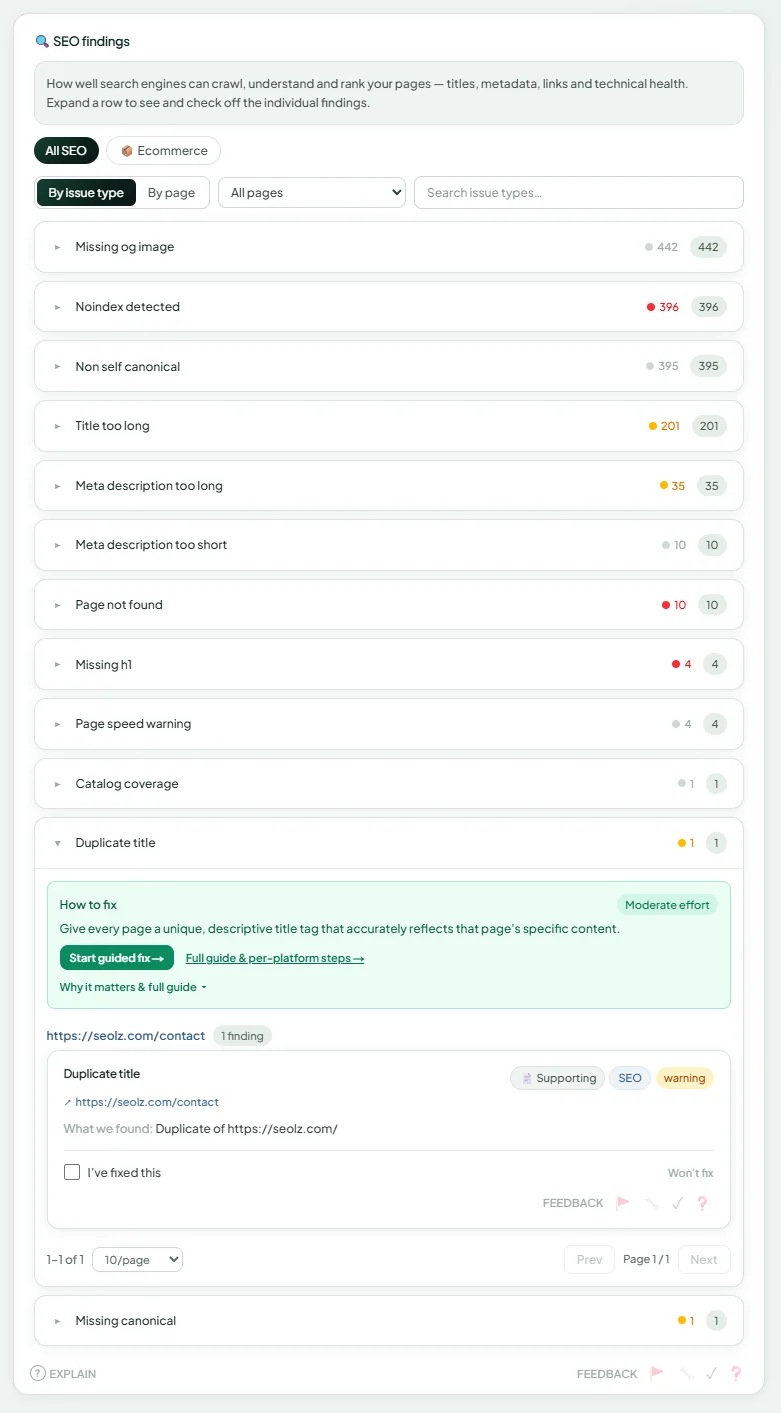
Every page crawled, classified by type, and checked against the rules for that type — because a product page missing schema is a different problem from a category page with thin content. If Google can't crawl it, rank it, or understand it, SEOLZ finds it. Findings cover:
- ✓Pages Google can't crawl or index
- ✓Duplicate title tags across product variants
- ✓Thin content on category pages (under 150 words)
- ✓Faceted navigation creating thousands of duplicate URLs
- ✓Missing or broken canonical tags
- ✓Internal link depth (products buried more than 3 clicks deep)
- ✓Core Web Vitals: LCP, INP, and CLS per page
Your /collections/mens-running-shoes page is generating 847 parameterized URLs from filter combinations (?color=, ?size=). 0 of them have a canonical pointing to the clean URL. Google is splitting your crawl budget across all 847.
Fix: One canonical tag in your theme. SEOLZ writes the exact line of code.
AEO — Answer Engine Optimization
Can ChatGPT and Google AI actually read your products?
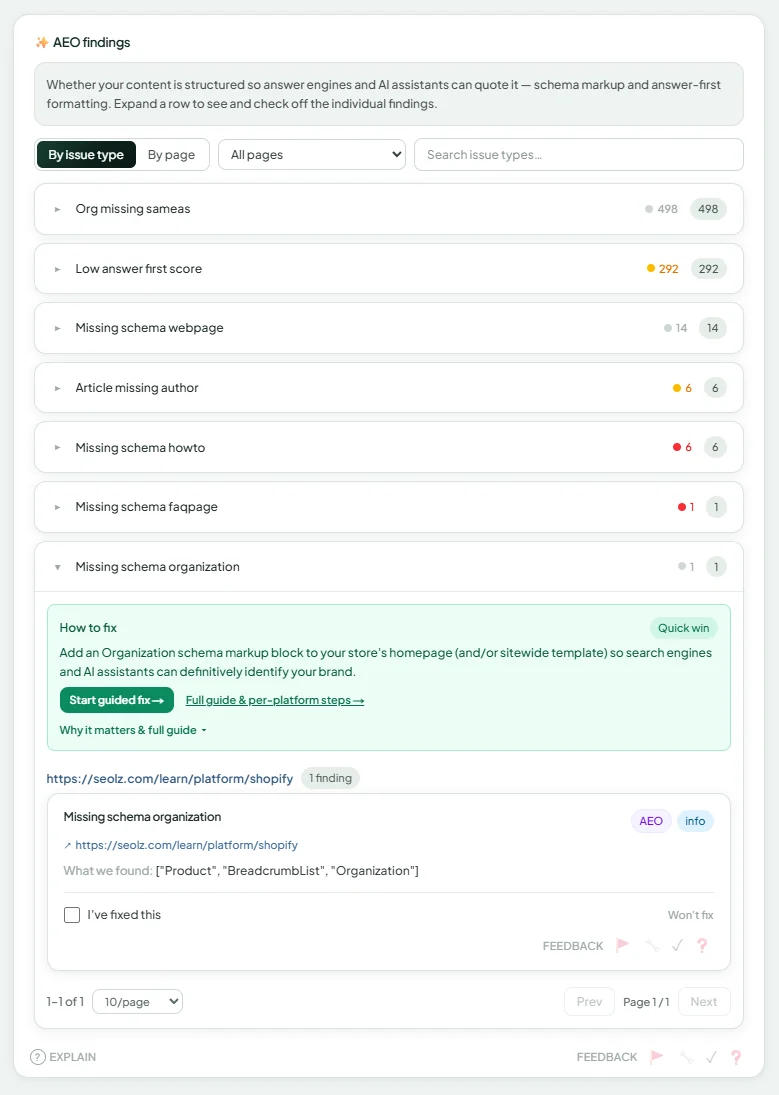
AI tools don't browse your site. They pull from structured data, and if yours is incomplete, malformed, or missing entirely, your pages don't get cited. SEOLZ builds a schema coverage matrix from your crawl data and scores your content against what AI engines actually require. SEOLZ checks:
- ✓Product schema completeness (price, availability, brand, GTIN, Offer nesting)
- ✓AggregateRating: present, value 1–5, reviewCount ≥5, rating ≥4.0
- ✓FAQPage schema (still valuable for AI Overviews)
- ✓EEAT signals: author bio, Person schema, ISO 8601 dates, Organization linkage
- ✓Deprecated schema types flagged
Your Product schema on /products/trail-runner-pro is missing AggregateRating. AI engines require a minimum of 5 reviews rated 4.0+ to surface products in recommendations. You have 47 reviews that could be imported.
Fix: Exact JSON-LD block written by AI. Copy, paste, done.
GEO — AI Visibility
Are AI assistants recommending your brand?
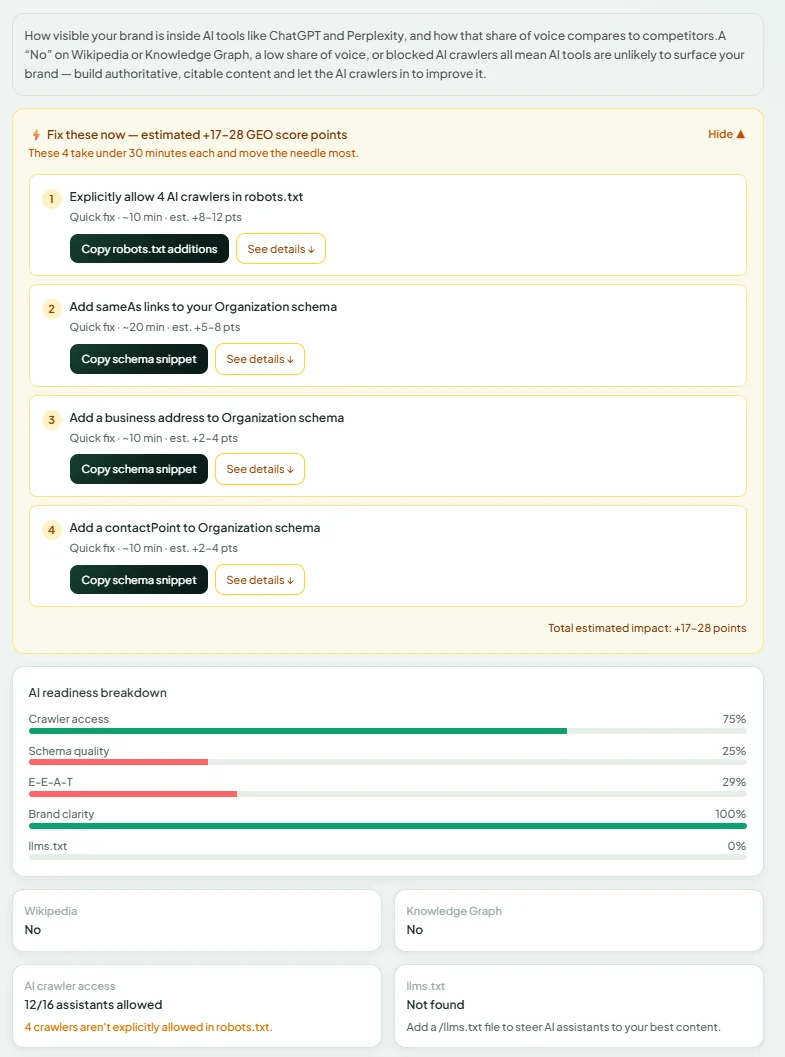
Most sites fail AI visibility at the first step: their robots.txt blocks the crawlers that power AI recommendations. Before anything else, SEOLZ checks whether AI engines can find you, crawl you, understand you, and cite you — in that order. And when an AI names a competitor instead of you, SEOLZ asks ChatGPT, Perplexity, and Google's AI live and shows you exactly which rival they recommend, per engine. SEOLZ checks:
- ✓Brand mentions — and which competitor is cited instead of you — across ChatGPT, Perplexity, Gemini, and Alexa for Shopping
- ✓robots.txt check: are GPTBot, ClaudeBot, PerplexityBot, Amazonbot and others allowed?
- ✓llms.txt: does it exist, and what does it grant?
- ✓Score trend: is your AI visibility improving over time?
Amazonbot is blocked in your robots.txt via a Disallow: / rule applied to all bots. Amazonbot powers Alexa for Shopping. Unblocking it takes 2 minutes.
Fix: One robots.txt line. SEOLZ shows you exactly what to change.
WCAG — Accessibility
Is your site legally and commercially accessible?
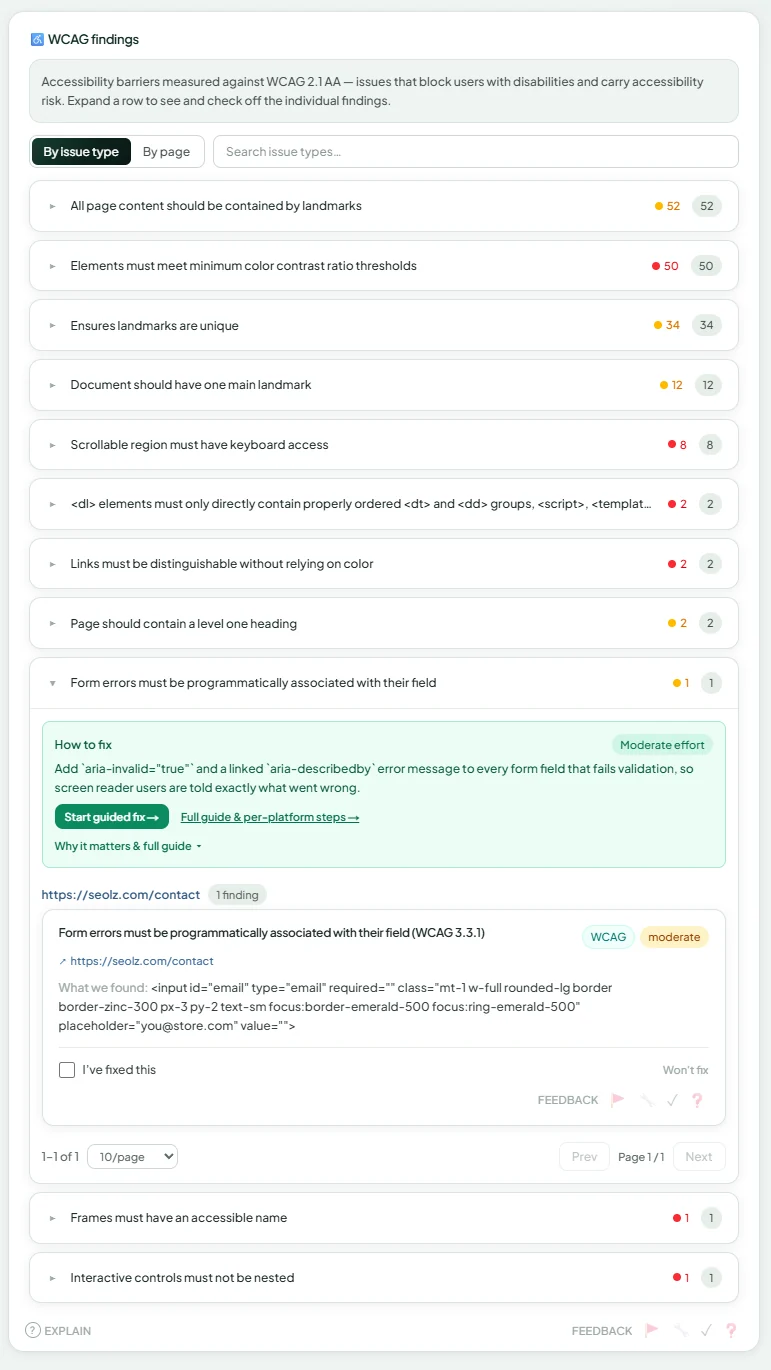
Static HTML scans miss the accessibility failures that actually get sites sued — dynamically injected content, JavaScript-rendered modals, checkout flows that break without a mouse. This is foundation work: the same semantic structure that lets a screen reader follow your page is what an answer engine needs to extract and cite it. SEOLZ renders your pages in a real headless browser with JavaScript fully executed, then runs axe-core against the live DOM. SEOLZ checks WCAG 2.1 AA:
- ✓Missing alt text on product images
- ✓Color contrast failures (common on sale badges and CTAs)
- ✓Keyboard navigation: can a user complete checkout without a mouse?
- ✓Form labels: are your checkout fields correctly labeled?
- ✓Focus indicators on interactive elements
23 product images on your category pages have empty alt attributes. This affects both screen reader users and Google Images indexing. Add descriptive alt text: not 'IMG_4521.jpg' but 'Men's trail running shoe in navy, size 10.'
Fix: A descriptive alt attribute per image — SEOLZ drafts them for you.
OWASP — Security
What would a hacker see on your site right now?
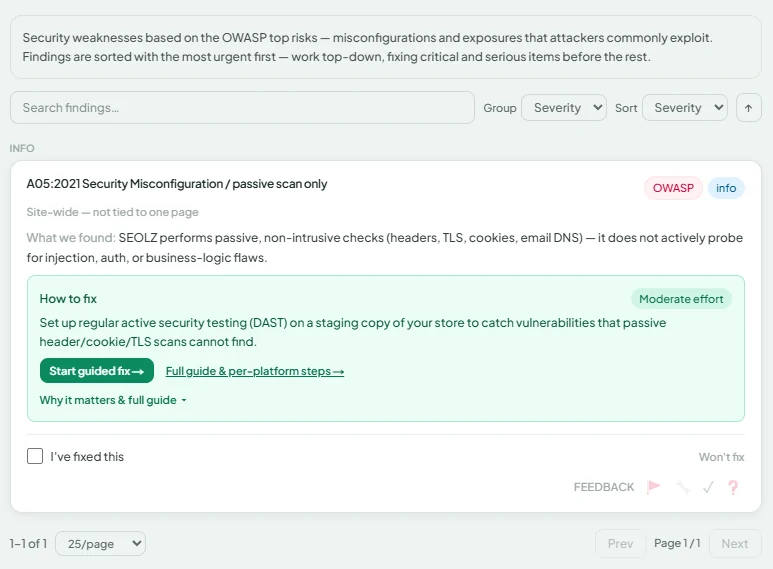
Security failures aren't hypothetical — they show up as Google warnings, customer trust erosion, and compliance risk. SEOLZ runs live probes against your site's security posture: no intrusive testing, nothing that touches your live site, but everything a security professional checks first. What gets checked:
- ✓HTTP security headers: Content-Security-Policy, X-Frame-Options, HSTS, Referrer-Policy
- ✓SSL configuration: cert validity, protocol version, cipher strength
- ✓Cookie security flags: HttpOnly, Secure, SameSite
- ✓Server version disclosure
- ✓SPF and DMARC: is your domain protected against spoofing?
Your site is missing a Content-Security-Policy header. CSP prevents cross-site scripting (XSS) — the most common attack vector on the web. Adding it is one line of server configuration.
Fix: The exact header to add. SEOLZ gives you the value and where it goes.
Lifecycle — Operational Health
What's quietly breaking in the background?
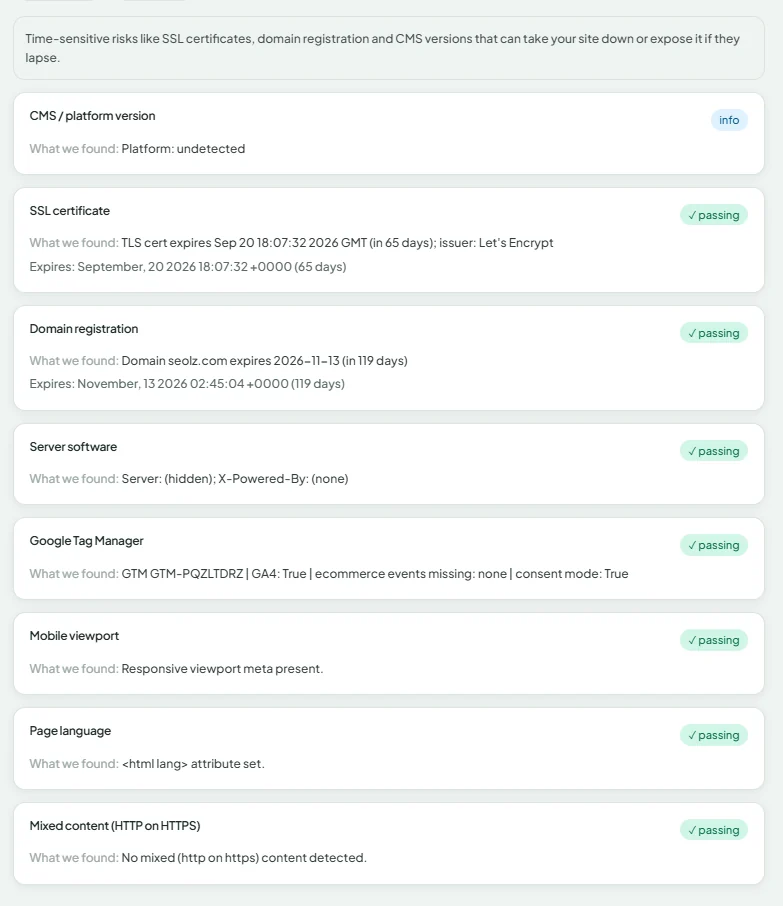
SSL expires. Domains lapse. Plugins accumulate CVEs. None of these send a warning before they cause an outage or a ranking drop. SEOLZ watches your operational health on every audit — so you find out 30 days early, not the morning your site goes dark. SEOLZ watches:
- ✓SSL certificate expiry — alerts ahead of the deadline
- ✓Domain expiry — alerts ahead of the deadline
- ✓CMS and platform version (WordPress, WooCommerce, Shopify)
- ✓Plugin vulnerability detection (WordPress sites)
- ✓GTM completeness: GA4 base tag, ecommerce events, duplicate tags, consent mode
Your SSL certificate expires in 34 days and auto-renewal failed on the last cycle. If not renewed, your site will display a security warning to all visitors. Here's how to manually renew it.
Fix: A head start and step-by-step renewal — before anything goes dark.
A finding without a fix is just noise.
Every finding goes through the same pipeline before it reaches your dashboard.
Triage
Findings are ranked by revenue, not an abstract severity label. Each is scored on triage tier (1–3), effort estimate, and revenue impact — Tier 1 is high impact, low effort, so fix it first. When your Search Console is connected, the ranking is weighted by the clicks each page actually earns; without it, the ranking falls back to reach and issue severity.
Platform-specific instructions
The fix steps you see are matched to your detected platform and SEO plugin. Fixing a missing canonical in WooCommerce with Yoast is different from the same fix in a Shopify store using an SEO app. You get the right steps, not the generic ones.
Plugin conflict detection
If SEOLZ detects two SEO plugins installed — or GA4 configured both natively and via GTM — it flags the conflict inline on the fix view. You see which plugins are fighting, what the conflict means, and which one to defer to.
Fix artifacts
For technical fixes, SEOLZ generates the actual code: schema blocks for your product pages, GTM container JSON you can import, canonical implementations, structured data for your specific page types. Copy it. Paste it. Done.
Fix once, fix many
Related findings are grouped into bundles — single, template-level actions that resolve dozens of findings at once. Fixing your product schema template can clear findings in SEO, AEO, and product quality simultaneously, so a week of one-by-one edits collapses into a ten-minute change to the template that emits them all.
Verified fixes
Mark a finding fixed and the next scheduled audit re-checks it against a fresh crawl — so you get proof it landed, not just a checkbox you ticked. If it's resolved, it moves off your action list. If it regressed, you get notified. Your score history tracks the movement over time.
Fix it your way — including with your own AI agent.
Work the list in the SEOLZ dashboard, or connect your coding agent — Claude Code, Cursor, Windsurf — over MCP and clear it right in your repo. Same worklist, same evidence, same verification — in your editor. It's the exact loop we used to fix our own site.
Your agent pulls the worklist
A per-site token connects Claude Code or Cursor to the SEOLZ MCP server. Your agent asks for the next fix — prioritized, de-duplicated, batched by fix surface, and resumable across sessions.
…with the real failing element
Every fix carries the actual node on each page — the selector and colors for an accessibility issue, the over-long value for SEO, the missing schema for AEO — plus platform-specific steps and a code example. No guessing from a generic prescription.
You apply it — SEOLZ verifies
Your agent edits your repo (we never touch your code); you mark it done and deploy. SEOLZ re-checks it — title/meta/schema/canonical/headers instantly, accessibility on the next full scan.
Your tag manager probably isn't giving you the full picture — here's what we check.
Duplicate GA4 events. Ecommerce tags firing on page load instead of purchase confirmation. Missing consent mode. These aren't edge cases — they're what SEOLZ finds in nearly every connected site. Connect your Google account and SEOLZ pulls your live GTM container, Search Console data, and GA4 property into the audit.
What the GTM audit checks
- ✓Consent mode configuration (v2 compliance)
- ✓GA4 configuration tag presence and deduplication
- ✓Ecommerce event coverage — purchase, add-to-cart, begin-checkout firing correctly?
- ✓Tag health — firing rules, trigger conditions, paused tags, orphaned variables
- ✓Pixel coverage — Meta, TikTok, Pinterest, and other ad platform tags
The GTM growth brief
For connected sites, SEOLZ generates an AI-written growth brief after each audit. It cross-references your GTM findings with your Search Console traffic and your most critical SEO findings — and produces a prioritized narrative: what's broken in your measurement setup, what pages it's affecting, and what to do first.
For common gaps, SEOLZ generates importable container JSON — consent mode, GA4 ecommerce events, Meta Pixel. Download the file, import it into your GTM workspace, review, publish. The implementation work is done.
Everything resolves into one prioritized action list.
When the audit completes, SEOLZ doesn't hand you six separate reports. It hands you one dashboard — a single composite score, a Revenue Risk readout, and a prioritized action list that tells you what to fix first, why, and how. We've got you.
Revenue Risk
A single 0–100 risk score across your findings — ADA barriers, AI visibility gaps, traffic-weighted SEO impact, measurement blind spots from broken tags — with the breakdown behind it. It updates after every audit, so you can see whether your risk is trending up or down. A prioritization signal, not a dollar figure or legal advice.
Today's Focus
One thing to fix, surfaced regularly. Not a list of 200 items. One clear action with platform instructions and a fix artifact attached. It's the highest-impact fix available to you right now, ranked against your actual GSC traffic if connected.
Score history
Every audit writes to your score history. Track SEO, AEO, GEO, WCAG, OWASP, and Lifecycle over time — and correlate improvements with the fixes you applied. When a fix moves your score, you'll see it. When a regression appears, you'll know before it compounds.
Reports your clients can read
Build a report layout per client with the drag-and-drop builder. Add your branding. Export as interactive HTML, PDF, or Markdown — pulled from the same data the dashboard shows, so nothing drifts. No copy-paste, no screenshot assembly — the report pulls live from your audit data every time you generate it.
Then it doesn't stop. It keeps watching.
The audit is a photograph — true the second it's taken, stale by your next deploy. So between scans SEOLZ keeps watching the fragile, revenue-critical things and tells you the moment one regresses — not at your next audit.
It re-drives your critical flows
Between audits, SEOLZ re-drives checkout, login, cart, search and contact by keyboard — catching an accessibility regression the moment a deploy introduces it, not months later. Overlays and static scanners can't: they read markup, not behaviour.
It watches your security posture drift
A dropped security header, a component with a newly-published CVE, a subdomain that's become hijackable, a certificate issued for your domain by a CA you don't use, DMARC weakened — SEOLZ watches for the change, not just a point-in-time score.
It watches your AI answers and your certs
When a competitor takes an AI answer you used to hold, or an SSL certificate or domain is heading for expiry, you hear about it early — while it's still cheap to fix, and before it takes you offline.
One feed, ranked, correlated
Everything that changes lands in one activity feed, ranked by what it's costing you. And when several things move in the same window, SEOLZ connects them into one incident — one deploy, not three separate fires.
Ready to see it on your site?
Connect your site and get a full six-pillar welcome brief — every score, every Revenue Risk flag, the top findings across all six surfaces. No credit card.